
LDAPS Benefits & Password Features
Microsoft’s 2020 LDAP channel binding & signing advisory. In late 2019 Microsoft announced that LDAP signing and channel binding would be enforced by default on domain controllers. The recommended response, then and now, is to enable LDAPS on the domain controllers Foldr authenticates against (typically by installing the Domain Certificate Services / Enterprise CA role) and to update Foldr’s LDAP server URL to use the
ldaps://prefix on port 636. The rest of this article covers exactly that.
LDAPS – Security & Enables Additional Features
By enabling LDAPS on an Active Directory Domain Controller, Foldr can be configured to authenticate users securely over LDAP using SSL port 636. Along with the security benefits that this brings, additional password features are also then available within Foldr:
- Password Control
- Delegated Password Control
- Self Service Password Reset
Enabling LDAPS on a Windows domain controller is typically done by default after installing the Domain Certificate Services >> Enterprise CA role in Server Manager. However, there are considerations to be made when enabling this in your AD infrastructure. While a self-signed certificate may be used, LDAPS can also be achieved by installing a signed certificate obtained via a recognised certificate authority:
https://www.petri.com/enable-secure-ldap-windows-server-2008-2012-dc
http://social.technet.microsoft.com/wiki/contents/articles/2980.ldap-over-ssl-ldaps-certificate.aspx
Password Change
Allows users to change their own Active Directory password from within Foldr itself using the web, desktop or mobile apps. Likewise, if the users password has expired or is set to change at next logon, then they will be prompted to change the password when the sign into Foldr.
To enable the feature:
- Ensure the domain controller is configured to accept LDAPS connections on port 636 (Use LDP utility on the Windows DC to confirm)
- Configure the LDAP Server within Foldr Settings >> Integrations >> Active Directory (LDAP) to use the prefix ****ldaps://
- Enable Password Change within Foldr Settings >> Security >> Passwords > LDAP
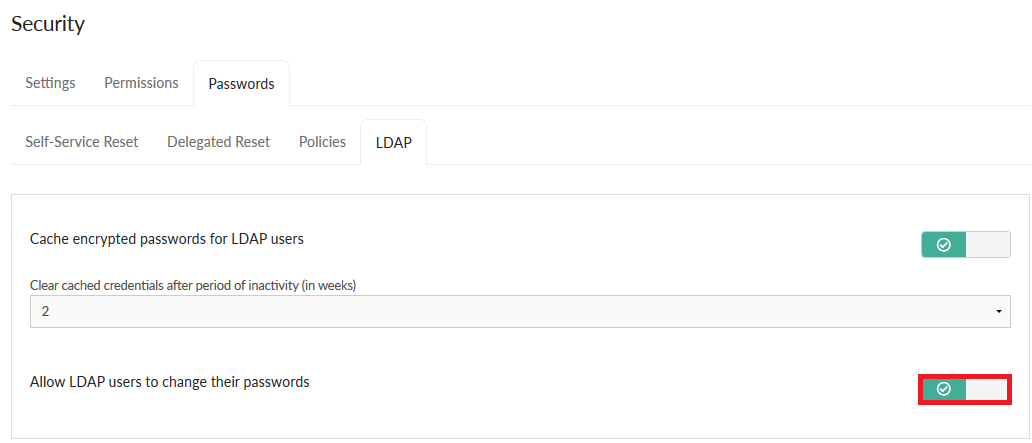
In addition to password change, Foldr will handle password expiration gracefully and will respects password policies/complexity set on the domain. In the event of a password expiring, the user will be prompted to change their password from the Foldr interface (web, desktop or mobile apps)
Password Policies
Foldr will respect any password policies set on the domain in Active Directory, however, the Foldr administrator can also apply password policies in Foldr to affect both domain and local accounts on the appliance itself. To configure a password policy in Foldr, navigate to Foldr Settings >> Security >> Password Policies. Policies can be set to apply to all users or specific groups or individual accounts as required.
Preventing users choosing weak/exposed passwords – Pwned Passwords Integration
By integrating with a third-party service, Foldr is able to prevent users from choosing weak passwords when they change their passwords through any of the Foldr apps. A weak password is considered to be one that has previously been exposed in a data breach of another other service.
This feature can be enabled within Foldr Settings >> Integrations>> Pwned Passwords and more detailed information is available here in this dedicated blog post.
Password hashes are checked against the haveibeenpwned.com service when using password reset, delegated reset and self-service reset.
Delegated Password Reset (Password Control)
Allows trusted users or groups of users to reset nominated domain users passwords from the web app. This could be useful in an educational environment allowing teachers to securely reset student passwords or designated staff to assist with password reset without involving the IT help desk.
This feature is disabled by default. To enable this feature:
- Ensure the domain controller is configured to accept LDAPS connections on port 636 (Use LDP utility on the Windows DC)
- Configure the LDAP Server within Foldr Settings >> Integrations >> Active Directory (LDAP) >> Servers to use the prefix ldaps://
- Enable Password Control within Foldr Settings >> Security >> Passwords >> Delegated Reset
- Ensure that the main service account set in Foldr Settings >> General >> LDAP has permission to reset users passwords in the OU(s) containing the user accounts involved. (Use the Delegation of Control wizard in ADUC on the OUs granting ‘read all user information’ and ‘reset password’ permission to the service account being used)
A new static password may be set by the trusted user using the delegated password reset feature and can optionally select the ‘must change password at next login’ and ‘unlock account’.
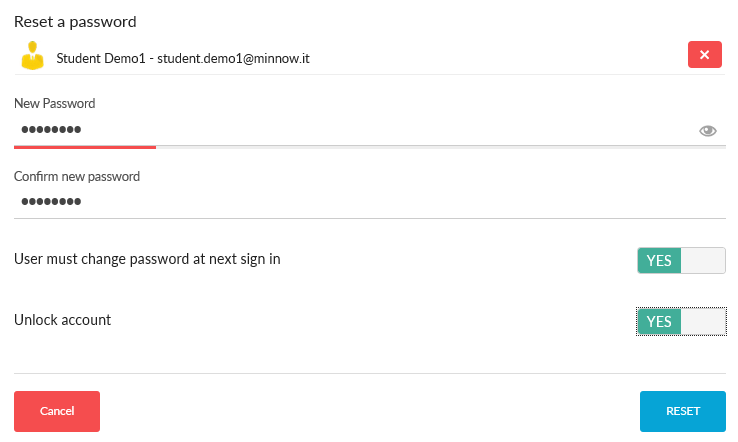
A dedicated setup article for delegated password reset/password control is available here
Self Service Password Reset
Allows users to securely change their own Active Directory password. A dedicated setup article for SSPR is available here
Troubleshooting: “Domain requires strong authentication”
If Test Settings in Foldr Settings returns “Your domain requires strong authentication, consider using LDAPS.”, the domain controller is enforcing LDAP signing and rejecting Foldr’s plain LDAP simple bind.
The recommended fix is to enable LDAPS on the domain controller (per the steps in this article) and update Foldr’s LDAP server URL to use the ldaps:// prefix on port 636. That gives you secure authentication and unlocks the password features above.
If for some reason you can’t enable LDAPS, the alternative is to relax the LDAP signing requirement on the DC. open gpedit.msc, edit the relevant GPO (typically Default Domain Controllers Policy), and under Computer Configuration > Windows Settings > Security Settings > Local Policies > Security Options set:
- Domain controller: LDAP server signing requirements = None (default)
- Network security: LDAP client signing requirements = Negotiate (default)
Enabling LDAPS is the better answer in almost all cases.